Thia Aide AI Receptionist Demo

Welcome to Thia Aide Receptionist
Your AI-powered virtual receptionist that greets visitors, answers questions, and collects client information — all automatically.
What Can Thia Aide Receptionist Do?
🏢 Industries & Use Cases
📚 Education & Language Schools
- Answer questions about courses, levels, pricing, and schedules
- Help students choose the right program
- Collect registration information (name, email, phone, level)
- Schedule placement tests
- Upload and analyze student documents
🛒 eCommerce & Retail
- Answer product questions (prices, availability, features)
- Search WooCommerce products automatically
- Help customers find the right product
- Upload and analyze product catalogs or price lists
- Collect customer preferences and requirements
🏢 Real Estate
- Answer questions about properties (price, location, features)
- Collect client requirements (budget, area, property type)
- Schedule viewings
- Upload and analyze property documents or brochures
💼 Legal & Professional Services
- Initial client intake and qualification
- Collect case details and personal information
- Upload and analyze legal documents, contracts
- Generate client briefs from conversations
🏥 Healthcare & Wellness
- Patient intake and pre-screening
- Answer FAQs about services, hours, insurance
- Collect patient information and medical history
- Upload and analyze medical documents or test results
💻 IT & Software Companies
- Technical support intake — describe your issue
- Collect bug reports and feature requests
- Answer documentation questions
- Upload error logs or screenshots for analysis
🎨 Creative Agencies & Copywriting
- Client discovery — ask smart questions about their project
- Collect project requirements, brand voice, target audience
- Upload creative briefs, brand guidelines
- Generate structured client briefs from conversations
🏨 Hospitality & Travel
- Answer questions about rooms, rates, availability
- Collect booking preferences and special requests
- Upload and analyze travel documents or itineraries
💰 Finance & Insurance
- Collect client financial information securely
- Answer policy and product questions
- Upload and analyze financial documents
🔑 Key Features for Any Industry
- Custom Questions: Define exactly what information you want to collect
- Smart Search: Searches your website, knowledge base, products, and uploaded files
- Handover: Transfer to a real person when needed
- Brief Generator: Create structured summaries of conversations
- File Upload: Read and analyze PDFs, Excel, Word, and more
- Multi-language: Responds in the same language as the client
How It Works
- Welcome Screen: Visitors see a friendly AI greeting with a chat input on your homepage.
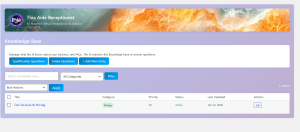
- Smart Answers: The AI answers questions about your services, prices, schedules, and more — using your Knowledge Base.
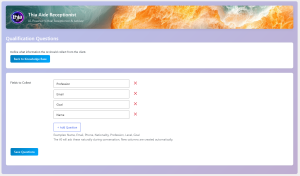
- Collects Info: The AI naturally asks for name, email, phone, and any custom fields you define.
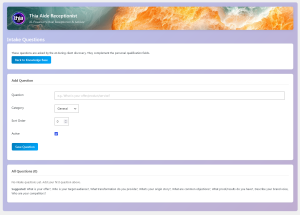
- Discovery Questions: Ask open-ended questions to understand client needs better.
- Brief Generator: Create a structured summary of the entire conversation with one click.
- Handover: When needed, transfer the chat to a real person on your team.
💬 What It Can Help With
- Answering questions about your products, services, and pricing
- Collecting client information (name, email, phone, custom fields)
- Asking discovery questions for deeper client understanding
- Searching your website pages, blog posts, and WooCommerce products
- Generating professional briefs from conversations
- Transferring to a human operator when needed
🔍 Smart Search
The AI searches across multiple sources to find answers:
- Knowledge Base — your custom entries about services and FAQs
- Website Pages — your existing content
- Blog Posts — articles and updates
- Products — WooCommerce products with prices
🔊 Text-to-Speech (Voice Reading)
Your AI receptionist can now read answers aloud in multiple languages with natural, human-like voices powered by Microsoft Azure Neural TTS.
How It Works
- Thia asks permission — On the first interaction, the AI asks: “Would you like me to read aloud? Say YES or NO”
- User says YES — The speaker icon turns green and voice is enabled
- AI reads every response — Automatically, in the correct language
- User says NO — Voice turns off, icon goes back to normal
- Manual control — Click the 🔊 icon anytime to toggle voice ON/OFF
🌍 Supported Languages
The AI automatically detects the language and uses the best female voice for each:
- 🇧🇬 Bulgarian — Kalina
- 🇬🇧 English — Aria
- 🇩🇪 German — Katja
- 🇫🇷 French — Denise
- 🇪🇸 Spanish — Elvira
- 🇸🇦 Arabic — Zariyah
- 🇷🇺 Russian — Svetlana
- 🇨🇳 Chinese — Xiaoxiao
- 🇯🇵 Japanese — Nanami
- 🇰🇷 Korean — SunHi
- …and many more!
🎯 Key Features
- ✅ Auto-detection — No need to set language manually
- ✅ Natural voices — Microsoft Neural TTS, not robotic
- ✅ Remembers preference — Voice setting is saved in your browser
- ✅ Works everywhere — Welcome screen and floating chat
- ✅ AI can enable it — Just say “YES” when asked
📎 File Upload Feature
Your AI receptionist can now read and analyze uploaded files. Clients can attach PDFs, Word documents, Excel sheets, PowerPoints, CSVs, and text files directly in the chat.
How It Works
- Client uploads a file by clicking the 📎 button next to the chat input
- The file is processed instantly — text is extracted from PDFs, DOCX, Excel, PowerPoint, and more
- AI reads the content and can answer questions about it, summarize it, or analyze data
- The file appears in chat as a clickable attachment with the file name
Supported File Types
- PDF — reports, brochures, manuals
- Word (DOCX, DOC) — documents, proposals
- Excel (XLSX, XLS) — spreadsheets, price lists, data
- PowerPoint (PPTX, PPT) — presentations
- CSV — data files
- TXT — plain text files
💡 Use Cases
- Upload a price list and ask “What’s the cheapest option?”
- Upload a product catalog and ask “Tell me about product X”
- Upload a brochure and ask “Summarize this for me”
- Upload meeting notes and ask “What are the action items?”
- Upload a spreadsheet and ask “What’s the total revenue?”
How to Enable
Go to Settings → File Uploads and turn ON “Enable File Uploads”. That’s it!
🔒 Privacy & Security
- Files are stored securely in a protected folder
- Only accessible through the chat interface
- You can delete conversations and files anytime
Viewing Uploaded Files
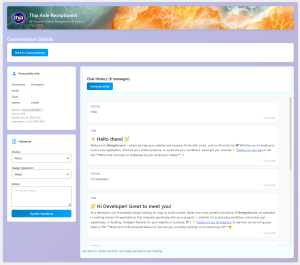
All uploaded files appear in the Conversation Details page as clickable links. You can download them directly from the admin panel.
Customizable
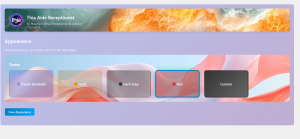
Change the chat widget colors to match your brand. Choose from preset themes or set custom colors.
Brief Generator
Turn conversations into structured briefs. The AI compiles personal info, intake answers, and chat history into a professional summary — perfect for client handoffs.
Team Ready
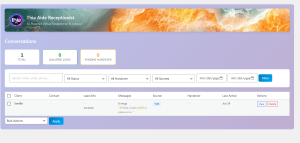
Multiple operators can take over chats. See who’s online and assign conversations to the right person.
💡 Tips for Best Results
- Add detailed entries to your Knowledge Base
- Define custom qualification questions to collect the right info
- Use intake questions for client discovery
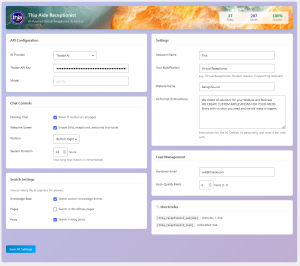
- Customize the AI Prompt to match your brand voice
Gallery Admin